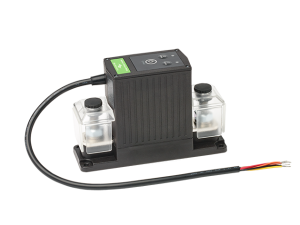
TBS DC Modular — Battery Protect Relay (500A)
Smart magnetic-latching contactor with built-in battery protection
The DC Modular Battery Protect Relay (TBP) has the same capabilities as the Remote
Battery Switch (RBS). It is a smart high current magnetic latching contactor, that can
handle continuous DC currents of up to 500Amps. Whereas the RBS is mainly used as a
locally or externally controlled battery load switch, the TBP has a number of additional
features. Most importantly, it can protect your battery without the need of an external
measurement and control device.
Besides controlling the TBP remotely, buttons positioned at the top also provide a way
to open or close the main contact locally. For external control, the TBP is equipped
with a 5 wire interface cable. It can be configured to accept two wire or single wire
ON/OFF commands for optimal flexibility.
The TBP is a magnetic latching relay, which means that there is no current draw from the
battery when the contact is closed. This is a great benefit compared to regular relays
which do require a (sometimes significant-) hold current to keep the contact
closed.
Besides all features and benefits of the RBS, the TBP has battery protection built in.
It will automatically open the main contact once the battery voltage has dropped below a
programmable low voltage level. When subsequently the battery voltage has risen above
the programmable reconnect voltage, the main contact is closed again.
Another handy TBP feature is the Override mode. In situations where the TBP has opened
the main contact due to a battery under voltage, long-pressing the close button (local
or external) will close the main contact for 1 minute. This allows the user to jumpstart
a low battery system. When after this minute the battery voltage remains too low, the
contact will open up again. But it remains closed when during the override time, a
charger has been connected causing the battery voltage to recover.
For more information, please download the datasheet from the link below, or check this
YouTube video for general installation information.
Contact